Parallel Coding Agents in 2026: Seven Tools, One Bottleneck
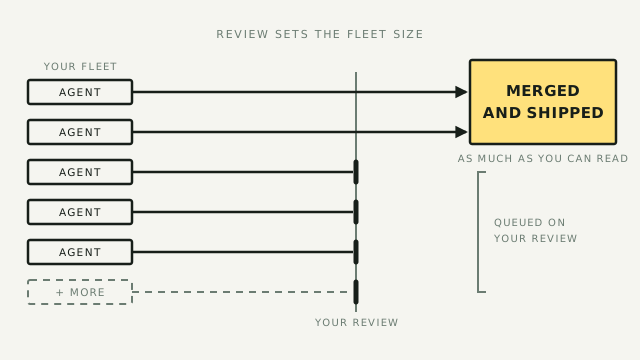
The day one coding agent starts earning its keep is the day you want three. You got here the slow way — you ran Claude Code or Codex in a terminal, probably inside a sandbox after the first scare, and now an afternoon of work lands in four minutes and you've run out of things to feed it. The obvious next move is to run several at once: one on the bug, one on the feature, one on the cleanup you keep postponing.
This piece is about what that move actually costs, and the seven tools that matter in the lane that grew up this year to manage it. It ends with a recommendation I run myself, and with the strongest case I can make against that recommendation.
What actually breaks when you parallelize
Running several agents at once is not the hard part. Point two terminals at two folders and you're parallel. What breaks is everything around it, and it breaks in a specific order.
First they step on each other. Two agents editing the same checkout of the same repo will overwrite each other's work mid-task, and neither will notice. The fix is old and boring: git worktrees. I'll explain it in operator terms below, because most of this lane is built on it, and the two newest entrants are built on rejecting it.
Then you become the bottleneck. This is the part nobody's demo shows. Three agents produce three streams of finished-looking work, and every one of those streams needs a human to read the diff, decide it's sane, and merge it. The agents' time got cheaper; yours didn't. A thread on r/ClaudeAI in August put a name to it: "Running multiple agents in parallel is bringing back context-switching fatigue." The top reply is the most useful thing anyone said in the whole lane this month: "I'd first look outside of code for your answer. You are, in effect, graduating to senior manager/c-suite in your function. Those roles, even before AI, have always been brutal for context switching."
Another reply in the same thread: "Much easier to manage three or four agents that oversee arcs and manage their own agents than trying to manage sixteen directly yourself." That is the actual management lesson, and it's the one this whole piece hangs on: the number of agents you can run is set by the number of outputs you can review, not by the tool.
The skeptics are in the same threads. When r/ClaudeCode asked "how are you guys running multiple agents at the same time" this month, one of the top replies was simply: "Simple. I don't and I still move faster than nearly everyone at my company. Well those delivering value anyway. Tons of slop that never survives to prod." Parallel agents multiply whatever your review process lets through. If your review process is "looks fine," fleets turn "looks fine" into a lot more code.
Worktrees, and the fight over their future
Before the tools, the mechanism, because it's simpler than the marketing suggests.
A git worktree is a second (or fifth) working copy of the same repository, in its own folder, on its own branch. Same project, same history, separate files. Give each agent its own worktree and they stop overwriting each other entirely: three agents, three folders, three branches, and git's normal merge machinery decides what survives.
One real-world detail from the practitioners, because it's the kind of thing that costs an afternoon to learn: if your project runs a server, each worktree needs its own ports, or two agents can't run the app at the same time. The top answer in the r/ClaudeAI thread on agents stepping on each other: "git worktree. And if the repo has networking/services to spin up, the worktree sets it up on randomised port(s) for each worktree so each instance can run in parallel." The same reply adds the second practitioner move: build "a headless test harness the agents can use to check their work," so an agent can verify itself before it hands you a diff.
You can run this pattern with no new tools at all: git worktree add five times, one terminal per folder, a notebook to track what you asked whom. People do exactly this and it works.
Five of the seven tools below are opinions about what to build on top of that pattern. The other two, Amp and Warp, are bets that the pattern itself is the relic: if agents run in someone else's cloud on machines you never see, there's no worktree choreography to manage at all. Where you land on that fault line is the biggest decision in this lane, and it's worth knowing it's a fault line and not a feature list.
Who holds the loop
The seven differ less in what they do than in who holds the loop while the fleet runs: your terminal, a runtime, your phone, a review queue, one app, the agent itself, or an org-wide platform. Most are free and open source; the two cloud bets are not, and I'll say so where it matters. All of them run the agents and subscriptions you already pay for rather than selling you model access.
cmux
cmux is a native macOS terminal, built in Swift with no Electron, using Ghostty's rendering engine. Its bet is that the terminal is already the right home for agents and doesn't need replacing — it needs to catch up. The agent-awareness is concrete: tabs live in a vertical sidebar showing git branch, working directory, and ports; panes grow a ring when an agent needs your attention; and the notification is driven by the standard escape sequences agents already emit, so anything from Claude Code to Codex works with no integration.
And it does orchestrate — from the bottom up. The CLI and its Unix socket can create workspaces, address every terminal surface, send input, and read state back, and a skills system packages those moves for agents to use. The proof is public: a third-party prompt set demonstrates a single orchestrator agent standing up, driving, and tearing down a whole fleet of agent teams inside cmux, with leads and workers in labeled panes. The philosophy, in the author's own words, is "a primitive, not a solution." cmux hosts orchestration; you bring the orchestrator, usually an agent you direct.
Pick it if you're on a Mac, you want the fleet visible and quiet-until-important, and you'd rather compose your own orchestration than adopt someone else's. The catch: no worktree management, no diff review, no task model ship in the app. Mac-only, and the iOS companion is a TestFlight beta gated behind the paid Founders Edition.
Herdr
Herdr attacks a different failure: in most desktop agent apps, quit the window and the agents die with it. Herdr's answer is architectural: a server owns the terminals, and every interface is just a client. The TUI can attach, detach, or crash without the agents noticing; so can the CLI, plain SSH, and your phone. It's a multiplexer in the tmux lineage, written in Rust, that also understands agents: it knows which pane is an agent and whether it's blocked, working, done, or idle, and it can wait on an agent instead of you polling it. The CLI and a JSON socket expose all of it, which means agents can drive Herdr itself, splitting panes and waiting on each other.
It keeps your terminal emulator, has no web view and no hosted control plane, and carries 986 community plugins auto-discovered from GitHub. The Reddit verdict from the how-are-you-running-multiple-agents thread was dry and fair: "Herdr is pretty good. I usually just use Warp with a bunch of tabs." (The same person's fuller answer: they tried a number of solutions and landed on plain tabs. The lane in miniature.)
Pick it if your agents should survive your laptop: a server or Mac mini runs the herd, you attach from anywhere over SSH, phone included, and you live in terminals by preference. The catch: Herdr is the layer under manager apps, not one of them. Its own comparison page says it "pairs happily with a worktree manager." No review flow, no task board, and you're the one running the server.
T3 Code
T3 Code starts from a different observation: the agents live on your machine, and you increasingly don't. It calls itself an "agent harness control surface": it doesn't replace your agents, it remote-controls the ones already installed, on the subscriptions you already pay ("If they're set up on your computer, T3 Code can control them"), aimed at Claude Code, Codex, Cursor, Grok Build, and OpenCode. One server (npx t3@latest), and three ways to drive it: an Electron desktop app that doesn't feel like one, a web app, and genuinely good mobile apps. The testimonials are all versions of "I did real work from my phone, from another country": "I was 2,000 miles away on holiday and able to do iOS development from just my phone."
It comes from T3 Tools (Theo Browne's create-t3-app orbit, launched to a well-known dev-YouTube audience), published under MIT with an explicit fork-it-if-we-stray stance, and Linux is a first-class citizen.
Pick it if the phone is the interface you actually want: checking in, approving, and steering agents away from your desk. The catch: the README says it in its own words: "We are very very early in this project. Expect bugs." Contributions are mostly closed while the team finds the shape, and it's a control surface, not a review environment.
Conductor
Conductor is the manager-app archetype, executed cleanly. Add your repo; every agent you spin up gets an isolated workspace (a fresh git worktree, stated plainly in its FAQ); one screen shows who's working, what needs attention, and what's ready; you review diffs in-app, edit files directly in them, and merge. It runs the first-party Claude Code, Codex, Cursor, and OpenCode agents under your existing Claude plan or API keys, and Conductor Cloud adds sandboxed microVMs that keep working after you close the app, plus a mobile app and an API. The free tier is real: parallel agents, local workspaces, $0. A Y Combinator-backed team ships it at a pace its own users remark on.
Pick it if your bottleneck is exactly the review pile and you want it to be an app rather than a discipline: of the seven, this is the one whose whole interface is the queue. The catch: it's closed (no public repo), Mac-first, and the cloud layer sits behind paid tiers. Teams is $60/user/month, invite-only at capture, and the Pro price didn't render when I looked.
Orca
Orca is the biggest local bet here. It calls itself an ADE (an agentic development environment) and it wants the whole loop: fan one prompt across five agents, each in its own worktree; compare the results; comment on any diff line and ship the comments back to the agent; merge the winner. Around that core sit GitHub and Linear boards (open a worktree straight from a ticket), an embedded Chromium browser whose Design Mode sends any clicked UI element's HTML, CSS, and a screenshot into the agent's prompt, Ghostty-class terminal splits, a VS Code-based editor, SSH worktrees onto bigger machines, a headless server mode for a VPS, and a mobile companion. It runs any CLI agent (about twenty with first-class treatment) on your own subscriptions. MIT, free, from Stably AI.
It is also the lane's runaway: roughly 30,700 GitHub stars at the end of July, 63,500 as I write this in early September. The lane is hot, and Orca is its center of gravity.
Pick it if you want the fan-out-review-merge loop to live somewhere purpose-built, all day, in one app, and you're willing to move your workflow to get it. The catch is its own section below.
Amp
Amp, Sourcegraph's coding agent, is the lane's heresy, and its pitch line is the bluntest sentence in the category: "Forget worktrees. Keep sending prompts instead." The mechanism is Orbs: ephemeral remote machines where Amp agents run without supervision. Every new thread gets a fresh orb with your repository cloned and tools installed ("you set up nothing"), and the orb installs whatever the task turns out to need, from browsers to databases. When it's done, only the diff leaves the orb. Spawn unlimited ones, from a $0.08/hour typo-fixer to a $2.13/hour 16-core box, billed by the minute, auto-paused when idle. Agents spawn other agents in fresh orbs and hand work between them, and review includes diffs, the agent's evidence, and a terminal into the same machine, from a browser, the CLI, or your phone, because nothing runs on yours.
Pick it if the choreography itself is what you want gone, and you'd rather pay by the minute than manage machines at all. The catch: closed, metered (the only tool here where running the fleet is itself a line item), and "forget worktrees" means your work happens inside Amp's cloud. The fork-it-and-leave exit stories of the local tools don't apply.
Warp Oz
Warp is the terminal company, and Oz is its answer to the moment fleets stop being personal and become organizational: who can start an agent, on what spend, running where, and who can see what it did. Agents start from an @warp mention, an event, or a one-line API call; the platform routes tasks across frontier and open-weight models to balance quality and cost, powering them with Claude Code, Codex, or Warp's own, switchable at any time; a single pane shows every agent across the team with one-click session audits; and a persistent Agent Memory the company says is yours to keep even if you leave. It runs self-hosted or Warp-hosted, and its showpiece customer is an agent that lives in Slack, connects to Jira, and "writes 54% of its own code."
Pick it if the question is governance — a team's worth of agents needs one control plane, and self-hosting matters to you. The catch: the terminal is open-source but the platform isn't, and it's priced like a platform: free-but-rate-limited, then Build at $18/month, Max at $180/month, Business at $45/user/month, with a "Factories" offering still early-access. A solo operator gets little from the control plane; that's not who it's for.
At a glance
| Tool | What it is | Agents run | Worktrees | Review | Pricing | License |
|---|---|---|---|---|---|---|
| cmux | macOS terminal | Your Mac | No | View only | Free | GPL |
| Herdr | Multiplexer | Any SSH box | No | None | Free | Apache-2.0 |
| T3 Code | Control surface | Your machine | Partial | None | Free | MIT |
| Conductor | Manager app | Mac, plus cloud | Yes | Diffs, merge | Free; $60/user | Closed |
| Orca | Full environment | Desktop, VPS, phone | Yes, core | Diffs, comments | Free | MIT |
| Amp | Cloud agent, Orbs | Amp's cloud | No | Diffs, evidence | $0.08–$2.13/hr | Closed |
| Warp Oz | Control plane | Warp or self-host | No | Audit only | Free; $18–180/mo | Closed |
Facts and prices verified against vendor sites and GitHub on 7 September 2026. This lane moves weekly; treat every number as a snapshot.
The lane is bigger than these seven
Seven made this piece because each represents a distinct answer to who holds the loop. The lane itself is much bigger, and moving fast:
- Worktree manager apps — Emdash and Superset are Conductor's nearest relatives: worktrees, diffs, and review queues in a window.
- Paseo (paseo.sh) — self-hosted, run Claude Code, Codex, Copilot, and OpenCode from desktop, phone, or terminal.
- Solo (soloterm.com) — a desktop workspace for managing agents alongside your dev stack.
- Two different AgentBoxes — agent-box.sh is a skill that spawns subagents in isolated VMs and integrates with cmux or Herdr; madarco/agentbox is a separate tool that runs agents in parallel sandboxed VMs. Same name, different tools — worth knowing before you search.
- Pivot — a fork of T3 Code that pivoted to remote-ready control over a local WebSocket server. A fork six weeks into a project's life is its own signal about the lane's pace.
- plannotator — visual annotation of agent plans and diffs, aimed at the review layer specifically.
- Omnigent (Databricks) — an open-source meta-harness that sits above Claude Code, Codex, Cursor, and Pi rather than beside them: define an agent in a short YAML file, swap its harness or model on one line while prompts, tools, and skills stay put, share a live session by URL with inline comments routed back to the running agent, and cap spend with Python policies. A server holds state and policy; a runner executes on your laptop or a cloud sandbox, so credentials stay local while the session follows you to a phone. Open-sourced June 2026, with a managed version on Databricks. It is the closest thing in the lane to an open-source answer to what Warp Oz sells.
- Terax (terax.app) — a ~7MB Tauri 2 and Rust workspace that puts a terminal, editor, file tree, git panel, and live web preview in one window, and launches Claude Code, Codex, Gemini CLI, Pi, OpenCode, or Grok inside it. Worth naming the limit, since this is a fleet piece: it is a single-workspace tool. Panes cap at four and every one of them shares a single working directory, and the word "worktree" appears nowhere in the source. It belongs here as a workspace, not as a way to run a herd.
- And the pattern keeps generating one-repo entrants monthly: operator-oss, agent-orchestrator, and their relatives. A tool whose GitHub has gone quiet is a tool to avoid in this lane; momentum is the feature.
Most of these will deserve pages by the next sitting.
Operator's take
I run Orca daily. It's what this site is built with, and I got there the long way: plain Ghostty, cmux, Warp, VS Code with extensions, Zed, Terax, and Databricks' Omnigent all got a real try first. That's exactly why the case against it deserves the most care, not the least.
The strongest case against Orca: it's the biggest lock-in of workflow in a lane full of tools designed to avoid lock-in. cmux wants to be your terminal; leave it, you've lost a terminal. Herdr wants to be a runtime; leave it, you've lost a server you were running anyway. Orca wants to be your editor, your terminal, your browser, your diff review, and your task board. The whole surface of your working day. If a 63,000-star, two-months-from-doubling project stalls, pivots, or simply ships a redesign you hate, you don't lose a utility; you lose your workplace. The tracker tells the rest: 5,469 open issues at last look, against Herdr's 289 at comparable scale. Daily shipping and hypergrowth show up as churn you relearn, and an Android app that still ships as a manually-downloaded APK at version 0.0.32 is honest about its maturity. The company behind it is four people. A project carrying 63,000 stars and your entire working day on a four-person team is a thin bus factor, and no amount of momentum changes that arithmetic.
That case is real, and I run it anyway. The clean interface and workspaces I can shape myself are what made it stick day to day, and the worktrees plus the skills that orchestrate them are what made it fast. What actually decided it was the remote hosts. Three Macs (a Studio, a Mini, and a MacBook Pro), an iPhone, and a VPS all drive the same fleet, so the machine I happen to be sitting at stops being a constraint. GitHub and Linear issues feed straight into that: a ticket becomes a worktree without my typing anything. There is a lot in there I still haven't opened. Open source with real backing is what makes the bet tolerable rather than reckless. If the team is four people, MIT plus an investor with a reputation is the difference between a project that can vanish and one I can fork the day it does. For me the whole-office bet pays. For a lot of readers it won't, and the honest order is:
- Don't parallelize past your review capacity. Time how long one agent's diff takes you to review honestly. That number, not the tool, sets your fleet size. If it's ten minutes and you have an hour a day, you have room for a handful of agents, not a herd.
- Run the pattern before you buy any opinion about it.
git worktree addtwice, one agent per worktree, separate ports, a test command each agent runs before handing you the diff. An afternoon, zero new tools, and you'll learn which problem you actually have. - Visibility is your problem → cmux. Mac, native, fast, the best answer to "which of these five needs me," and orchestration primitives you can drive with an agent you direct.
- Continuity is your problem → Herdr. Agents that survive your laptop, reachable from a phone over SSH, driven by an API the agents themselves can use.
- Distance is your problem → T3 Code. The best phone-first steering surface, from a team that ships in public, accepting "expect bugs" as the price.
- The review pile is your problem → Conductor. The queue as a polished app, with a real free tier; accept closed-source and Mac-first.
- Governance is your problem → Warp Oz. One control plane for a team's worth of agents, self-hostable; accept enterprise shape and unpublished pricing.
- The choreography itself is your problem → Amp. Pay by the minute, never think about worktrees or machines again; accept that your work lives in their cloud.
- The loop is your problem → Orca. Fan-out, review, and merge in one place, which is what a fleet is for, taken with open eyes about the size of the bet and with your git hygiene doing the exit-insurance work.
The fault line underneath all of it: the local five bet that git worktrees plus your machine remain the backbone, and the cloud two bet the backbone dissolves into someone else's infrastructure. I'm on the local side (my exit story is a repo I can fork and worktrees git already understands), but I hold that loosely; if Amp's meter or Oz's control plane matches your constraints better than ownership does, the heresy might be orthodoxy by this time next year.
If you're still at one agent and it hasn't earned its keep yet, none of this is for you yet: get that one agent working safely first, and come back when you're the bottleneck. The fleet tools are great at running agents in parallel. What they can't do is review them in parallel. That's still you.