I Ran a Real Build Inside a Sprite. Here's What Survives
The job
You want an AI coding agent to work on a real project while you are away from the keyboard. Your laptop is the wrong place to give it an unsupervised shell, but moving it to a cloud box creates a different worry: is this a real computer or a demo-shaped container? If it sleeps, do your files survive? If your build needs Docker, does Docker work? If a command fails, will the box tell you?
That was the test. I put a real Astro repository inside a Sprite, installed its dependencies, ran the production build, let the machine go idle, restored a checkpoint, and installed Docker. The answer is useful because it is uneven. The filesystem survived the sleep-and-wake test, checkpoint restore worked, and Docker ran. The command runner still needed a wrapper before I trusted its output.
The benefit of running the agent here is not that remote code is automatically safer, but that it gets a shell without getting the rest of your laptop: its repository, packages, credentials, and experiments live in a bounded environment that you can checkpoint, reuse, or delete without repairing your main machine. When the work needs another session or another computer, the same filesystem gives you somewhere to return instead of a setup tour every time.
The problem Sprites solves is the pile of setup around that environment. A VPS can run the code, and a local Docker setup can isolate it, but you still assemble the machine, persistence, wake behavior, rollback, process restart, credentials, and cleanup yourself. Sprites puts those pieces behind one named environment and one CLI/API. For me, that is the reason to choose it: ease of getting a reusable remote computer, not a unique ability to run Node.
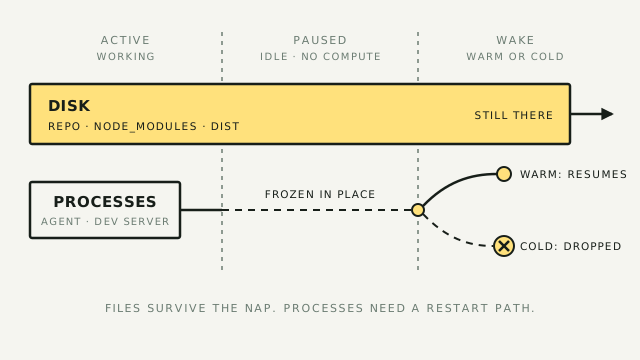
A Sprites developer uses the analogy of a deli container: it is not long-term storage, but it is not single-use either. You fill the same container with a working environment, use it for a session, put it back on the shelf, and reuse it for the next session. Files and installed packages persist; processes and in-memory state do not survive a cold wake.
This is not another setup guide for sending messages to an agent. The companion playbook Run a CLI Agent in a Disposable Sandbox covers the Slack front door. This one tests the thing behind it: whether the remote computer is good enough for real work.
The stack
The test used four pieces:
- Sprites — the remote computer. A Sprite is a hardware-isolated Linux environment with a persistent filesystem, checkpoint and restore, and a pause-when-idle lifecycle. Compute stops while it is paused, while files and installed packages remain on disk.
- Fly.io — the infrastructure company behind Sprites. The connection matters because Sprites is built on Fly's microVM background rather than presented as a generic shared container.
- Claude Code or Codex — the agent that can work inside the box. The pilot tested the computer and build path rather than comparing model quality, so the result is about the substrate, not which agent writes better code.
- A real repository — the test workload. A toy
hello worldproves that a shell opens. A repository with dependencies and a production build tells you whether the environment is useful.
The existing Sprite playbook covers the basic agent setup. For this test, I left Slack out on purpose. The question was whether a machine that an agent could use would survive the ordinary mess around a build.
The build
1. Start with a box you can reset and reuse
Create a named Sprite and open a console in it. The exact commands are sprite create and sprite console; the important part is to record the starting state before you install anything. Note the Node, npm, Git, and kernel versions. You need a baseline when a build behaves differently from the same build on your laptop.
The current Sprites working guide lists Claude CLI, OpenAI Codex, Node.js, Git, and common utilities as preinstalled in each Sprite. The pilot used npm successfully. Docker was not preinstalled, so it became an install-and-run test rather than a default feature.
2. Run a boring build before you add cleverness
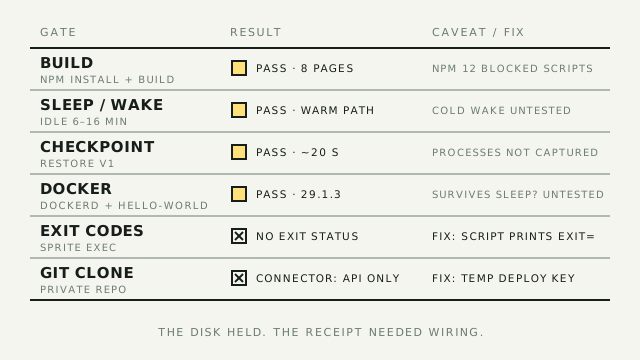
Clone a real repository, install its dependencies, and run the build command you would use in CI. In my test, that meant npm install followed by npm run build against an Astro project. The build completed successfully and produced the site's eight pages.
There was one version wrinkle. npm 12 blocked install scripts for esbuild and sharp by default, but the Astro build still passed. That is not a reason to ignore the warning. It is a reason to record it before deciding whether the environment matches your production toolchain.
Run this baseline before installing Docker, adding an agent, or wiring external credentials. If the clean box cannot build the project, another layer will only make the failure harder to locate.
3. Test the wake path, not just the first boot
A Sprite is designed to pause when nothing is using it. The official lifecycle has two wake paths: a warm wake resumes frozen processes quickly, while a cold wake starts processes fresh after dropping in-memory state. The filesystem is the durable part.
The persistence run passed the case I could exercise. After the Sprite went idle for between six and sixteen minutes, its boot ID was unchanged and the repository, node_modules, and generated dist directory were still present after wake. The unchanged boot ID is important: this proves the suspend-and-resume path, not a full reboot.
That distinction keeps the result honest. A process you started by hand is not evidence of a service that will come back after a cold wake. The agent process, a development server, or a Docker daemon needs a restart path if it must be available later.
4. Put a checkpoint before the risky step
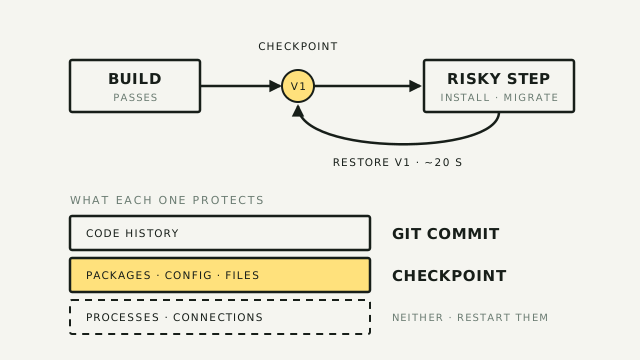
Persistence answers "will my files still be here?" A checkpoint answers "can I undo the environment if the next experiment goes badly?"
Create the checkpoint after the known-good build and give it a comment:
sprite checkpoint create --comment "Build passes before Docker"
Make a change after the checkpoint, then restore it:
sprite restore v1
The pilot confirmed that restore is a whole-filesystem rewind. A control file written after the checkpoint disappeared after restore, and the restore took about twenty seconds. The official behavior adds the caveat that a checkpoint captures the writable filesystem, not running processes or open connections. Restore restarts the environment and terminates active sessions.
Use Git for code history and checkpoints for the environment around the code. A checkpoint is a fast undo for packages, configuration, and experimental state. It is not a replacement for a commit.
5. Add Docker only if the workload needs it
The Docker test was simple. I installed the package inside the Sprite, started dockerd, and ran hello-world. Docker 29.1.3 returned a working client and server, and the test also worked from the non-root Sprite user through passwordless sudo. The environment exposed overlayfs and cgroups v2, so this was not a container-shaped fake where the daemon could never start.
That closes one important gate and leaves two open. I did not prove that dockerd survives a later sleep and wake, and I did not prove that a checkpointed Docker installation is a reusable base image. If Docker is central to your agent workload, run those tests before you build a process around it.
6. Make command results observable
The roughest part of the pilot was not the build. It was the command interface around the build.
Sprite execution takes an argument vector rather than a shell command line. Shell operators, pipes, redirects, and ordinary quoting do not behave as they do in an interactive shell. The execution response also returned stdout without an exit status, so a failed command could look like a completed one if you only read the output.
The workaround is deliberately boring. Write a script into the Sprite, invoke the script as one command, and print each exit code yourself:
#!/bin/sh

npm install
install_status=$?
printf 'npm install EXIT=%s\n' "$install_status"
[ "$install_status" -eq 0 ] || exit "$install_status"

npm run build
build_status=$?
printf 'npm run build EXIT=%s\n' "$build_status"
exit "$build_status"
This gives the agent an unambiguous receipt to report. It also keeps shell syntax inside a shell, where it belongs, instead of hoping the remote executor reconstructs it from a string.
7. Separate cloning from API access
The GitHub connector is useful, but it is not a Git credential. In the pilot, the connector was a REST gateway and could not authenticate a normal git clone, so the repository came in through a read-only deploy key. That key was revoked when the test ended.
Use the connector for API actions after the repository is present. Sprites stores connector credentials in the organization, routes requests through its gateway, and applies an access policy to each Sprite. The raw provider token does not sit inside the machine. Keep the clone credential narrow and temporary anyway. A gateway that protects API calls does not make a long-lived deploy key harmless.
Operator's take
The test changed my answer from "Sprites is a safe sandbox" to "Sprites is the easiest remote agent computer for me, with a few edges I still have to wire." Filesystem persistence passed. Checkpoint restore passed. Docker passed the basic run. Command evidence did not pass until I added an explicit receipt.
That ease is the product. A VPS can be more flexible. A local container can be cheaper. A managed coding-agent service can hide more setup. Sprites gives me one named place with a filesystem I can reuse, a checkpoint I can restore, and a lifecycle I can reason about. I do not have to assemble those pieces before I can hand an agent a real repository.
That last point is the one I would carry into every agent setup. A remote computer can have a durable disk and still give you a poor account of what happened. If the command layer does not expose an exit status, the agent needs to print one. If a process must come back after cold wake, define it as a service. If a job must finish before the box sleeps, use the Tasks API to hold it active. The official model separates services, interactive sessions, and tasks for exactly these cases.
The checkpoint is the other habit worth keeping. Take it before the agent installs a dependency, rewrites a configuration file, or runs a migration. The snapshot is fast because it is copy-on-write, and restoring it is cheaper than investigating a box whose state you no longer understand. Still commit the code. The checkpoint protects the surroundings, not your history.
The reuse boundary matters. I would keep a Sprite for a project or a series of sessions, not treat it as long-term storage. Git, backups, and the actual system of record still own anything I cannot afford to lose.
The economics are favorable for bursty work, but I am not carrying a per-session dollar figure into this draft. The current documentation describes active-compute billing, persistent storage, snapshots, and egress as separate parts of the bill. The old session estimate in the directory page came from secondary sources and needs an account-level check before anyone budgets against it.
This is the wrong setup if you want to try a coding agent once. Make a disposable folder on your laptop, run a small task, and find out whether the agent is useful before you build a remote environment.
It earns its place when the work is repeated, unattended, or risky enough that your laptop should not be the place where it runs. It becomes more useful when the agent needs Docker, a persistent checkout, or an integration that should not expose its raw token to the process.
The remaining question is not whether a Sprite can run a build. It can. The question is whether you need a remote agent computer often enough to justify defining the services, credentials, and receipts that make it dependable.