Front-End Your Airtable and Stop Paying Per Seat
Front-End Your Airtable and Stop Paying Per Seat
The job
You built something good in Airtable. A spreadsheet became a base, the base grew automations, and now it's the system your team actually runs on. Then the invoice showed up, priced per person, and half those people only open the base to check a status or approve one thing. You're paying builder rates for viewers.
The fix everyone reaches for first is "switch to something cheaper." Usually that's the wrong first move. The cheaper, faster fix is to stop letting viewers touch Airtable at all: keep the base as your backend, put a simple app in front of it, and pull everyone who isn't building out of the billable seats. This playbook is the full build behind that one line, the teardown promised by our Airtable-alternatives comparison, for the case where you've decided to keep Airtable and just want off the seat treadmill.
Done right, this takes a five-figure seat bill down to two or three admin seats, and the people you moved off Airtable get a cleaner experience than the raw base ever gave them.
The stack
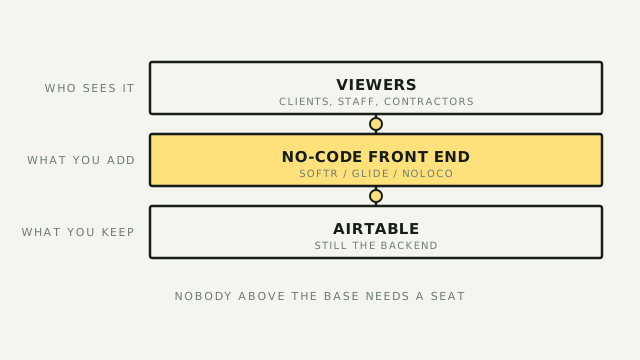
Two layers, and the whole trick is keeping them apart:
- Airtable stays the backend. Your data, relationships, automations, and system of record don't move. What changes is who may open it: admins and builders only.
- A front-end builder becomes the face. A no-code app reads and writes straight off your base, shows each person only what their role needs, and runs its own login. Viewers, approvers, and requesters live here and never see Airtable.
The front-end options split into two tiers, and picking the wrong tier is the most common mistake.
- Start with the native-Airtable tier. Softr, Glide, and Noloco connect to an Airtable base natively, with no second database and no sync to babysit, and they're built to be assembled by the same person who built the base. Softr leans client portals and public-facing apps; Noloco leans internal tools and client portals with heavier permissions; Glide leans mobile-first. For most operators, one of these three is the answer.
- The more-power tier costs you build time. WeWeb and Bubble go further: more design control, more custom logic, closer to a real app. WeWeb gives you designer-grade control and exports clean code. Bubble is the most flexible of the lot, and that flexibility is also the trap. A Bubble front-end has to be built carefully or it gets slow enough at scale to become genuinely unusable. Reach for this tier only when the native-Airtable three can't shape the app you need.
Why not just buy more Airtable seats, or lean on Airtable's built-in Interfaces? Because an Interface still bills the viewer as a seat the moment they need to do more than read, and it can't be locked down or branded like a real portal. The separate front-end is what turns "another editor seat" into "a login that costs you nothing per head."
The build
Six steps. The first three are the money; the last three are the polish that makes people actually use it.
1. Draw the line: what's backend, what's face. Decide that Airtable is now system-of-record only, and that nothing which isn't an admin or an automation gets an editor seat. This is a decision, not a config change, and everything else follows from it.
2. Model access before you build anything. List the roles that touch the data (viewer, approver, requester, client, admin) and write down, per role, exactly which records and fields each may see and change. This is the real work. Get it wrong and you either leak data or build screens nobody can use. The front-end enforces whatever you specify here, so specify it deliberately.
3. Pick the front-end by the job, not the brand. Client portal or public app points to Softr. Internal tool with tight permissions points to Noloco. Phone-first points to Glide. A layout the native three can't produce points to WeWeb or Bubble, knowing you've signed up for more build. Match the tool to the shape of the app; don't start from the logo.
4. Connect it to the base. Point the builder at your Airtable base with its native connector, so it reads your tables directly: same data, live, no export and no copy. Confirm writes go back cleanly, because a form submission or status change in the app landing in Airtable within seconds is the whole illusion you're selling.
5. Build the screens per role, expose the minimum. For each role from step 2, build only the views it needs and bind them to filtered data, so this approver sees only their pending records and this client sees only their project. Restraint is the product here. A viewer who sees three relevant screens is happier than one dropped into your whole base.
6. Gate access in the front-end, then cut over. Turn on the app's own authentication and row-level access so each login lands in its own slice. Then move your viewers and approvers into the app and remove their Airtable seats. That last clause is the entire point: skip it and you've built a nicer front door while still paying for the old one.
Operator's take
The economics are the reason to do this, so look at them straight. Airtable Business runs about $45 per user per month billed annually, so a 20-person base is roughly $10,800 a year before a single automation. Most front-end builders don't price per viewer at all: you pay by app or by tier, so three viewers and three hundred cost about the same. Cut twenty seats down to three admins plus one front-end plan and the savings show up at renewal, not as a rounding error. Run your own numbers, though, because vendors move pricing around; confirm both sides against their pricing pages before you commit.
What front-ending does not fix is Airtable's own ceilings. The base still has its records-per-base limit and its API rate limits, and a busy app with many concurrent users leans on that API harder than a few humans clicking around ever did. The native connectors manage most of this for you, but a high-traffic public app pointed at a base near its limits still hits that wall, just with a nicer interface in front of it.
The Bubble warning is worth repeating because it's where these projects actually fail. Bubble will let you build almost anything, including something slow. If you take the more-power tier, budget real time for performance work: pagination, careful data calls, and not loading a ten-thousand-row table into a single page. Built carelessly, a Bubble app degrades from impressive demo to "my team refuses to use it," and that failure is self-inflicted, not a tool limitation.
When not to do this at all: if the people you want off Airtable genuinely need to edit lots of structured data across many linked tables all day, a front-end fights them, and you're better off switching to a database where viewers are free. That's the comparison piece's job; Baserow and NocoDB are built for exactly that. Front-ending wins when most of your seats are viewers, approvers, and requesters. It loses when most of them are really editors in disguise.
The honest ceiling: the native-Airtable three take an operator remarkably far, but a truly custom, high-scale product is still a software project. WeWeb and Bubble narrow that gap and widen the "you might need a developer" zone at the same time. Knowing which tier your app actually needs, and stopping at the simplest one that does the job, is the whole skill. Start with Softr, Glide, or Noloco; reach past them only when the app you're describing refuses to fit.