Run a CLI Agent in a Disposable Sandbox (with Slack as the Front Door)
The job
You've watched the demos. Someone points an AI coding agent at a folder, types "clean up these 500 exports and rename them by date," and walks away while it does an afternoon of work in four minutes. You want that. What's stopping you isn't the agent — it's the two things nobody in the demo mentions: it runs in a terminal, and it runs on your computer, with permission to run any command it writes. Letting an eager AI execute arbitrary shell commands against your actual files, credentials, and system is a reasonable thing to be nervous about. So most operators watch the demo and never run the thing.
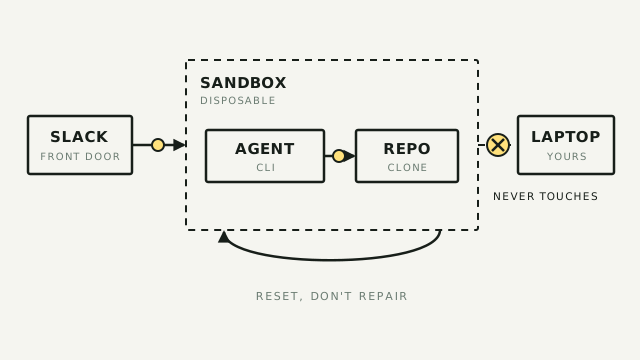
This playbook removes both blockers. You run the agent inside a disposable sandbox — a throwaway Linux computer that isn't your laptop — so the worst it can do is wreck a box you were going to delete anyway. And you drive it from Slack, a place you already live, instead of a terminal you don't. The whole point: the agent gets a real computer to work on, and you get to hand it real jobs without babysitting your own machine.
The sandbox here is Sprites (from Fly.io). The agent is Claude Code — though any CLI agent works; the pattern is the tool. Slack is the front door.
The stack
Three pieces, each doing one job:
- Sprites — the disposable box. A Sprite is a hardware-isolated Linux computer you spin up on demand. It keeps its files between runs, snapshots on command (so you can roll it back), and pauses itself when nothing's happening so you're not paying for an idle machine. This is the isolation layer: the agent lives in here, not on your laptop.
- Claude Code (or Codex, or any CLI agent) — the worker. It reads the box's files, runs commands, writes code, and reports back. You install it inside the Sprite; your API key lives in the box, never on your own machine.
- Slack — the front door. Sprites can wire a Slack connector to the box, so the agent posts progress and takes instructions in a channel. You talk to it the way you'd talk to a coworker, not through a black terminal window.
Why a Sprite and not just a folder on your Mac, or a plain cloud server? Two reasons a beginner will actually feel. First, checkpoint and restore: snapshot the box before you let the agent loose, and if it paints itself into a corner, rewind to the snapshot instead of untangling the mess. Second, scale-to-zero: the box sleeps after about 30 seconds of quiet and stops billing compute, then wakes in a fraction of a second when the next message lands — so an always-available agent doesn't mean an always-running bill. A plain server gives you neither.
The build
Five steps. The first three get an agent working safely today; the last two are the front door and the economics.
1. Create the box. Install the Sprites CLI (curl https://sprites.dev/install.sh | bash), then sprite login (it uses a Fly.io account) and sprite create my-agent. That's a fresh Linux computer with 8 vCPUs and 100 GB of disk, yours in seconds. Drop into it with sprite console -s my-agent — an interactive shell in the box, the same as if you'd SSH'd into a server, except you didn't have to set one up.
2. Put the agent in the box. Inside the console, install Claude Code and paste in your Anthropic API key. The key lives in the Sprite, not on your laptop — which is half the point. Point the agent at a task: upload a messy CSV, clone a repo, whatever the job is. Everything it touches is inside this box.
3. Snapshot before you let it run. This is the move that makes the sandbox truly disposable. Take a checkpoint — a snapshot of the whole box — before you hand the agent a big, unsupervised job. If it does exactly what you wanted, great. If it corrupts the data or installs half of npm and breaks something, restore to the checkpoint and you're back to a clean box in one command. No cleanup, no forensics. And if the whole box is beyond saving, sprite delete and start over — you lost a throwaway, not your afternoon.
4. Add the Slack front door. In the Sprites dashboard, open Connectors and add a Slack connection (choose "Slack as Bot"); you approve it through Slack's normal OAuth screen, then grant this Sprite access to it. Now the agent inside the box can read and post to a Slack channel through the Sprites gateway — and critically, the Slack token is stored once in your org and never copied onto the box. With that wired, you stop typing in the console: you drop a request in the channel, the agent picks it up, works in its sandbox, and reports back where your team can see it.
Be honest with yourself about this step: it's the hard 20%. Steps 1–3 are "install a thing and run a command." Wiring Slack so the agent reliably listens to a channel and answers is where you'll spend real time. It's the difference between "I ran an agent in a box once" and "my team hands the agent work in Slack and never opens a terminal." If you only need the former, you can stop at step 3.
5. Let it sleep. Do nothing and the box pauses after ~30 seconds idle; compute billing stops while it's asleep, and the next Slack message wakes it in 100–500ms with everything where it left off. The one wrinkle to know: a cold wake restarts processes fresh — installed tools and files survive, but a server or agent process you started by hand does not. If you need the agent to keep running through a long job without the box dozing off mid-task, Sprites' Tasks API holds it awake with a heartbeat until the work is done.
Operator's take
The honest value here is blast radius, not magic. Running Claude Code on your own machine is fine right up until the once-in-fifty run where it does something you didn't intend to a file you cared about. A Sprite makes that stakes-free: the agent's mistakes are confined to a box you can rewind or throw away, and its credentials never sit on your laptop. That's worth a real amount of peace of mind if you're going to let an agent work unattended — which is the only way the four-minutes-of-work promise actually pays off.
On money: this is not free, but it's cheap for what it is. Sprites bills for the compute you actually use and stops the meter when the box sleeps — a roughly four-hour Claude Code session runs on the order of $0.44, and paid plans start around $20/month. For an operator, the mental model is "a few dollars a month for a private, disposable computer the agent lives on," not "a server I'm renting around the clock."
Where this is the wrong move: if you just want to try a CLI agent once, don't build any of this — run it locally in a throwaway folder and see if you even like it. Sprites earns its place when you want an agent that runs repeatedly, unattended, and eventually team-accessible without you guarding your own machine each time. And a real ceiling to name: there's a fully-managed version of this pattern — Anthropic's Managed Agents can run each Claude session inside a Sprite you own, so "@Claude in Slack" executes in your sandbox — but wiring that up is genuinely developer-grade (self-hosted environment, a worker process, environment keys). That's the wall this playbook stops at. If you get to step 4 and want to go further, you've crossed from "operator with one good playbook" into "you need a developer for the next mile" — and knowing exactly where that line is is the value of reading this instead of a vendor page.