Airtable Alternatives in 2026: What Actually Leaves With You
If you run your business on an Airtable base, you spent the first week of August reading that your database has a new owner and wondering whether to get out. Then you looked at what getting out would involve, and stopped.
The reflex is worth more of your attention than the acquisition is.
What actually happened
On 4 August 2026, Bending Spoons signed a definitive agreement to buy Airtable in an all-cash deal: $1.285 billion enterprise value, roughly $2.25 billion equity value. It closed a month later, on 4 September 2026, with Bending Spoons taking 100% of the issued and outstanding shares.
Two corrections to the version going around. First, Bending Spoons is not a private equity firm. It's an Italian software company that listed on Nasdaq on 1 July 2026, and Airtable is its first acquisition since the IPO. Second, nothing has been announced about your pricing, your plan, or your data — not at signing, and not at close. CEO Luca Ferrari said the company is "committed to investing in Airtable for the long run, and doubling down on its core strength." The waiting period is over, though. Ownership changed hands on 4 September, which means the clock on that promise starts now rather than at some point next year.
One number explains the deal and it's the one that got least attention. Airtable peaked at an $11.7 billion valuation in 2021 and is selling for a fifth of that, against annual recurring revenue of about $480 million still growing over 20% year on year. Airtable isn't in trouble at those numbers. It's a healthy business going cheap, which is the kind Bending Spoons buys.
The receipts, since track record is all you have
Bending Spoons isn't structured like private equity, but it operates like it: acquire a mature product with real customers, cut cost, raise price, hold it for the cash. It has run that play in public four times, and the results are on the record.
- Evernote — acquired January 2023, 129 staff cut the following month. On 4 December 2023 the free plan was capped at 50 notes and one notebook, with no grandfathering for existing users. The annual personal plan went from about $69.99 to $129.99, and a late-2025 restructure replaced the old tiers with Starter at $99/year and Advanced at $249.99/year.
- Meetup — acquired January 2024. Organizer pricing rose on 6 June 2024 for all Standard organizers and new Pro organizers; organizers reported their costs doubling.
- WeTransfer — acquired 2024. In July 2025 a terms-of-service rewrite granted the company a perpetual, worldwide, royalty-free license over uploaded files, broad enough to cover machine-learning training. After a public backlash the clause was narrowed and the company said it does not train on user content and never had.
- Vimeo and AOL — also in the portfolio, and the reason the pattern reads as a strategy rather than a run of bad quarters.
WeTransfer walked that clause back within days, which is how it got shared as a happy ending. The terms governing your data are a document your vendor can rewrite on a Tuesday, and what stopped this one was that enough people read the diff.
None of this predicts what happens to Airtable. It does tell you what to have ready.
The exit test
Before you evaluate a single alternative, find out what would actually leave. It takes about twenty minutes and you can run it on your own base this afternoon.
There are two ways out of Airtable, and most people try the worse one first.
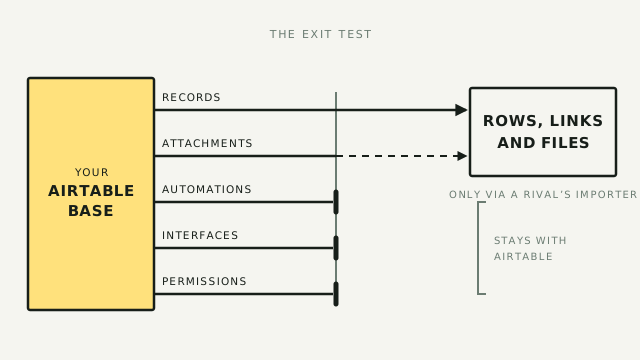
The manual export is thin. There's no export-the-whole-base button, so each table downloads as its own CSV and a twelve-table base becomes twelve files with none of the links between them. Attachment fields come out as URLs rather than files, and Airtable guarantees those URLs for only "at least 2 hours after receiving them." Miss the window and you have a spreadsheet full of dead links where your contracts and photos used to be.
The importers are much better, and nobody selling you a migration mentions them. Teable, Baserow, and NocoDB each ship an Airtable importer that talks to the API directly instead of making you shuffle CSVs around. They carry tables, fields, records, the links between records, and the attachments as real files. Baserow brings most field configuration and your views across as well.
So your data does leave, and in better shape than the CSV path suggests. What the importers can't take is documented by the destination vendors themselves: automations, interfaces, integrations, row comments, revision history, field descriptions, and access controls.
Read the fine print before you count on one.
- NocoDB's importer is still beta. It skips formula fields and flattens every link to many-to-many, which is a quiet way to lose the shape of your schema.
- Teable's is documented against its cloud product. Whether it ships in every self-hosted deployment is worth confirming for your own setup before you plan around it.
- All of them need a live API key and a base you can still reach. This is a door you walk through while it's open.
Which is the part that should bother you. Your best exit from Airtable is a connector built and maintained by a competitor who wants Airtable's customers, running on API access Airtable controls. It works well today. Nobody at Baserow owes you that importer past the quarter it stops paying for itself.
Your records travel. The system you built around them — the automation firing at 6am, the interface your ops team actually opens, the permissions keeping a contractor out of payroll — isn't data, and none of it is coming with you.
Airtable did not do this to you in response to being acquired. The expiring attachment links shipped on 8 November 2022, with a three-month opt-out that closed on 7 February 2023. That was four years before Bending Spoons made an offer, under founder-led management, for reasonable security reasons. The exit was already this shape. The acquisition is the first time you had a reason to walk over and look at it.
The question underneath all of this was never whether to leave Airtable. It's how much of your business sits in a shape only one vendor can read, and you'd want that answer if Airtable had never been sold at all.
What portability is worth paying for
Once you're grading tools on ownership rather than on features, the shortlist reorders. Three things do the work.
- A real export — the whole base in one operation, relationships intact, files as files.
- A database you could point something else at — Postgres or MySQL underneath, not a proprietary store with an API in front of it.
- A self-host option that isn't a bluff — an actual open-source license and a maintained repo, so leaving the vendor and leaving the software are separate decisions.
Nothing scores perfectly, including the alternatives. But that third one is the reason open-source keeps showing up below: not because self-hosting is free, and mostly it isn't once your time is priced in, but because a tool you could host is a tool whose owner has to keep earning you.
Where you'd land if you went
These are the landing spots worth your time, graded on the exit as much as the entry.
SeaTable — the closest like-for-like swap
The interface and view model will feel immediately familiar, which is most of the migration cost gone. Cloud Plus is €7 per user per month billed annually (€9 monthly), roughly a third of Airtable's, and Enterprise is €14 annually (€18 monthly) for unlimited rows. The free tier is unusually generous at up to 25 users and 10,000 rows, and the on-premises Server Edition has a permanently free 3-user licence with custom pricing above that.
Pick it if you want minimal relearning and a straight per-user discount. The catch: a smaller ecosystem, fewer integrations, and a thinner bench of experts to hire when it breaks.
Baserow — open-source, and viewers cost nothing
Baserow attacks the seat problem directly. On both cloud and self-hosted plans, viewers and commenters are free and you pay only for people who edit. Cloud runs $10 per user per month on Premium and $18 on Advanced billed yearly ($12 and $22 monthly), and only Admin, Builder, and Editor roles are billable — Viewers and Commenters are unlimited and free. It's API-first and holds up on large datasets.
Pick it if you want to own the deployment and have a lot of read-only users. The catch: you trade some of Airtable's spreadsheet polish for control.
NocoDB — flat cost, and it sits on a database you already have
The pricing is the pitch: on Plus and Business you pay for nine users and every user after that is free, so a nine-person team and a ninety-person team pay the same. Plus is $12 a seat annually ($15 monthly) and Business is $24 ($30 monthly), which caps out at $108 and $216 a month respectively. The free tier allows three editors. A newer Scale tier at $45 a seat drops the cap entirely, so check which one you're actually being quoted. Self-hosted Community is free and unlimited on seats.
The feature that matters for this piece is on Business: external database connections, which let NocoDB sit on top of a Postgres or MySQL database you already own and give it a spreadsheet face. Your data lives in your database, and NocoDB is the interface rather than the landlord.
One licensing note, since this piece is about what you actually keep. NocoDB moved to the Sustainable Use License on 29 January 2026: you can run and modify it for your own internal business purposes, but you can't sell it or offer it as a paid service. That changes nothing if you're running your own base. It matters if you're an agency planning to host NocoDB for clients as part of what you charge for.
Pick it if you want one predictable number, or you already have a SQL database you'd like people to edit. The catch: it reads as a database with a good UI rather than as Airtable, and the polish gap shows.
Teable — Postgres underneath
Teable stores your records in real Postgres tables rather than a proprietary format, which is the best foundation on this list. Read the gate before you plan around it: reaching that Postgres directly means self-hosting and buying a licence, and it isn't a feature of the cloud product at any tier. On Teable Cloud you get Teable's API, the same as you get anyone else's. Cloud is $10 a seat on Pro billed annually ($12 monthly) and $20 on Business ($24 monthly), and the Community Edition is free to self-host under AGPL.
Pick it if ownership is the reason you're shopping and you're willing to run it yourself and pay for the licence. The catch: it's the youngest tool here, and the headline reason to choose it sits behind the two decisions most teams are trying to avoid.
Grist — for teams that live in formulas
Grist brings real formula power (Python, not a function bar), granular access controls, and an open-source core. Cloud Pro is $10 a user per month ($8 annually) and Business is $30 ($24 annually, five-user minimum). The free Community Edition is genuinely free to self-host, but automations, SSO, and the AI assistant sit in the paid self-hosted tier at $30 a user ($24 annually), so "free self-hosted Grist" and "the Grist you'd actually run a business on" are different products. Self-hosting is free outright for organisations under $1M in annual income.
Pick it if your team's real complaint about Airtable is that the formulas run out. The catch: the interface is more analyst than designer, and the free tier drops the automation layer you're migrating for.
On APITable: it still appears on every list published before this year. Its open-source development has largely stalled, with little repo movement and beta-only releases into 2026. Steer clear for anything you plan to depend on, and apply the same rule to any tool whose GitHub has gone quiet. With open-source infrastructure, momentum is a feature.
The alternatives at a glance
| Tool | How you pay | Entry paid price (annual) | Self-host? | Who holds the database |
|---|---|---|---|---|
| Airtable | Per editor seat | $20/user/mo (Team) | No | Airtable. You get rows out via a rival's importer |
| SeaTable | Per user | €7/user/mo (Plus) | Yes (free to 3 users) | SeaTable, unless you run the Server Edition |
| Baserow | Per editor; viewers free | $10/user/mo (Premium) | Yes (unlimited) | You, if you self-host the open-source build |
| NocoDB | 9 seats, then free | $12/seat, caps at $108/mo | Yes (free) | You — Business connects to your own Postgres |
| Teable | Per seat | $10/seat/mo (Pro) | Yes (AGPL core) | Teable on cloud; you only with self-host + licence |
| Grist | Per user | $8/user/mo (Pro) | Yes (free core) | You on Community, but automations are paid |
Prices re-verified against vendor pricing pages on 31 August 2026. Vendors move these; confirm before you commit.
Don't switch — front-end it
For most teams reading this, the right move is still not to leave. It's to stop the bill growing while you fix the ownership problem separately.
Start by getting the seat maths right, because the common version of this argument is wrong. Airtable doesn't charge for read-only collaborators, form submissions, or share links on either Team or Business. If all your people do is look, you already aren't paying for them.
What costs you is anyone who needs to change one thing. Marking a job complete, updating a status, uploading a file: any of those needs an editor seat, at $20 or $45 a month, for a person who touches the base for nine seconds a week. That's the gap a front-end closes. The builders below connect natively to a base and write to it through the API, so your users get an interface that does exactly what they need and Airtable never sees them as editors.
The pattern:
- Airtable stays the backend. Your system of record, where the data and the automations live.
- A front-end builder reads and writes straight off it. No second database, no sync to maintain.
- Only admins keep Airtable seats. Everyone else lives in the front-end, where you control exactly what they can touch.
- You gate access in the front-end, not with editor seats.
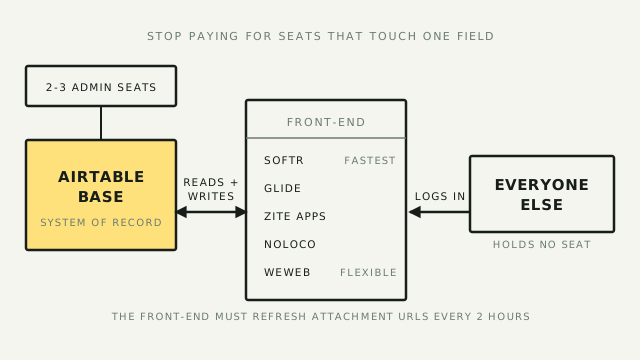
Five tools do this well, and they sit at different points on the effort-versus-ceiling trade.
- Softr — the fastest to something usable. Templates, a native Airtable connection, and a client portal live the same afternoon. You will hit its ceiling on anything with unusual layout or logic.
- Glide — the mobile one. It turns a base into something that behaves like a phone app rather than a website, which is what you want for field teams, drivers, and anyone working off a handset all day.
- Noloco — the middle, and the most flexible about where data comes from. One app can pull from Airtable, Google Sheets, Postgres, Supabase, MySQL, and Xano at once, without duplicating or migrating anything. That makes it the easiest way to move off Airtable gradually rather than in one weekend.
- Zite Apps — the one to look at if the seat maths is what brought you here. It connects to an Airtable base and reads and writes it live, and its pricing ignores seats entirely: Free, Pro at $15 a month, Business at $55 (annual), with unlimited users on every plan including free. Against $45-a-seat Business, that arithmetic isn't close.
- WeWeb — the most flexible and the pick when the portal is going to matter. It's a visual builder that doesn't pretend the web isn't underneath it, so you get real control over layout, components, and data binding. It costs you a steeper first week.
Two caveats on Zite Apps, because the second one decides where it fits. Its supported data sources are its own Zite Database, Airtable, Google Sheets, and file imports. There is no external Postgres, Supabase, or MySQL connection, so Zite can front a database you already have only if that database is an Airtable base. It cannot sit on one you host yourself.
That also means the alternative to Airtable here is Zite Database, which is Zite's store rather than yours. Building your system of record there swaps one vendor's proprietary format for a younger vendor's, which is the move this article argues against. Pointed at an Airtable base you own, the objection doesn't apply and the seat maths is excellent. It's the reason Zite Apps is absent from the architecture below: that pattern needs a front-end that reads your own Postgres, and Noloco and WeWeb do while Zite doesn't.
We wired this up end to end in a separate teardown, so this is the summary rather than the build.
Now the part that belongs in a piece about ownership. Front-ending deepens your Airtable dependency, and it adds a second vendor with its own owner and its own terms. It also runs straight into the attachment problem: a front-end serving files out of Airtable has to refresh those links inside the two-hour window, which is a known chore in every one of these tools' support forums. This move buys you cheaper at the cost of more portable. Most teams should still make it, with that on the table.
If you're going further than that
Front-ending fixes the bill and leaves Airtable holding the database. The next move up stops letting any vendor hold it.
The shape is: your data lives in a Postgres database you own (Supabase and Neon both make that a ten-minute job), a grid sits on top of it for the people who need spreadsheet ergonomics, and a front-end serves everyone else, with room to replace that later without touching the store. NocoDB Business connects to an external Postgres directly, and self-hosted Teable is the other route in. On the front, Noloco reads Postgres and Supabase natively and WeWeb gives you the most room to grow. The database is the thing you keep. Everything above it becomes a choice you can revisit.
Two honest caveats. The Postgres and grid steps have to land together, because a database nobody can read is not a migration you've finished. And this is a genuine step up in operating burden: you now own backups, migrations, and uptime that Airtable was quietly handling. It's the right architecture for a system you intend to run for years, and overkill for a base tracking your client pipeline. If you can't yet say who'd own the backups, you're the second case, and front-ending it is where you stop.
What leaving actually costs
Be honest about the bill before you calculate the savings.
- Polish and edge cases. Airtable has had years to smooth over rough spots the alternatives are still hitting: performance at scale, mobile apps, the small interactions you never notice until they're gone.
- The ecosystem. Templates, tutorials, an integration marketplace, and a large pool of people you can hire. The alternatives are thinner here, some much thinner.
- The rebuild. Moving the data is the easy half. The automations, the interfaces, the views, and the retraining are the number that decides it, and the number every migration guide leaves out.
If you run a mature setup with automations wired through it, free open source can cost more than Airtable does once the rebuild is priced in.
The operator's take
I build these systems for a living, which mostly means I get called after someone else's migration. The order I'd give a team today:
- Run the exit test this week, whatever you decide. Export a base, click an attachment link three hours later, then point a free Baserow or Teable trial at the same base and see what the importer actually brings across. Write down what's still missing. Twenty minutes buys you a real number instead of a feeling, and you want it whether you move or not.
- Then get your files out of the field. The importers handle attachments today, which means your file recovery currently depends on a third party's connector still working. The fix is boring and permanent: keep the source of truth in storage you control and put the link in Airtable, not the file. Do this one thing and you stop needing anyone's importer to get your documents back.
- Front-end it before you migrate it. It's the fastest money saved for the least disruption, and it costs you nothing if you leave later. Most teams should stop here.
- If you're genuinely leaving, pick for the reason you're leaving. SeaTable for a clean swap, Baserow to hold the deployment, NocoDB Business if you want it sitting on a Postgres you own. Teable is the best foundation of the six, but only if self-hosting and a licence are things you'll actually do. Don't chase the lowest sticker price; it's rarely the lowest total once the rebuild lands.
- Don't leave on the news. Nothing has changed about your account, and a migration run on adrenaline in August is a migration you redo in November.
An acquisition is useful mostly because it makes you audit something you'd otherwise never open. Your base is exactly as portable this month as it was last month. You just checked.
Which makes the real question whether you'd be comfortable with any vendor holding what Airtable currently holds for you. If the answer is no, that's true today, whoever signs the paperwork in December.