What "MCP" Actually Means for Your Business
You've seen the letters in every AI newsletter for a year: MCP. Nobody stops to say what it is, because the people writing about it are building with it, and to them it's obvious. So you're left with the feeling that a thing you should understand has already passed you by.
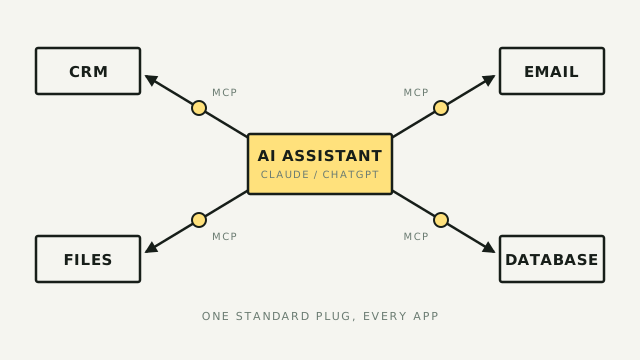
Here's the whole idea in one sentence. MCP is the standard that lets your AI assistant do things in your other apps, instead of only talking about them. The email it drafts, it can send. The CRM record it summarizes, it can update. The gap between "my AI gives good advice" and "my AI does the work" is the gap MCP closes. Whether that's worth your attention right now is the actual question, and the honest answer has moved a lot in the last six months.
What it actually is
MCP stands for Model Context Protocol. Strip the jargon and it's a standard plug. Anthropic's own shorthand is "USB-C for AI," and that's the right picture: before MCP, connecting an AI to a tool meant a custom wire built by a developer for that one pairing. MCP is the single shape both ends agree on, so any AI that speaks it can connect to any tool that speaks it, no custom wire.
Three things it is not, because the name makes people assume otherwise:
- Not an app you buy. MCP is a free, open protocol, like the format behind email or the web. There is no "MCP" to purchase and no license fee.
- Not a thing you build. You don't write MCP. Someone builds an MCP server for a tool (Slack, your CRM, Google Drive), and your AI assistant is the client that connects to it. Your job is to plug the two together.
- Not one company's product. It started at Anthropic in late 2024, but in December 2025 they handed it to the Linux Foundation, the same neutral body that stewards Linux itself. It's now a shared standard, not a bet on one vendor.
Why you're suddenly hearing about it
You're hearing about it now, and not a year ago, because two things changed that actually matter to a non-technical operator.
It stopped requiring a developer. A year ago, connecting an MCP server meant editing a configuration file by hand and, often, using a terminal. That's a hard stop for most operators, and rightly so. Today all three major assistants ship a point-and-click path: Claude has a reviewed extensions directory you install from in two clicks, ChatGPT has an apps catalog any user can add, and Claude on the web lets you paste in a connector without touching code. The wall that kept this developer-only is mostly gone.
It became a real standard, not a fad. The reason it's safe to spend an afternoon learning is that you're not learning one company's feature. OpenAI, Google, and Microsoft all adopted MCP through 2025, and the December 2025 move to the Linux Foundation put governance in neutral hands. A skill you build here carries across whichever assistant you end up using. That's the difference between this and the last ten "you have to learn this" AI trends.
Where you'll actually run into it
For an operator, MCP shows up in two honest forms. You don't need to go looking for exotic servers; the useful ones are attached to tools you already know.
- Built into your assistant. Claude and ChatGPT both have a directory of ready-made connectors (Google Drive, GitHub, Notion, and hundreds more). You turn one on the way you'd install a phone app. This is the lowest-effort door and the right one to start with.
- Bolted onto automation tools you already use. The automation platforms built hosted MCP servers, so their whole app library becomes available to your AI through one connection. Zapier MCP exposes its 8,000-plus apps this way, Pipedream runs a fully managed version so your passwords never touch the AI, and Composio and Activepieces cover the same ground with different trade-offs. If your work already lives in one of these, this is a short step, not a project.
The mental model: your assistant is the worker, and each MCP server is a door you open to one more room of your business. You decide which doors, one at a time.
What to do first
Skip the temptation to wire up ten servers in a weekend. The first move is small and low-stakes, and it teaches you the whole shape.
- Pick one assistant you already pay for (Claude or ChatGPT). Custom connectors need a paid plan on both, so this isn't a new bill, just a feature you already own.
- Turn on one connector from its official directory. Pick something read-only and boring, like Google Drive or your calendar. Boring is the point: you want to feel the "my AI can now see my stuff" moment without handing it the keys to anything it could break.
- Watch what it can now do, and what it asks permission for. A well-built connector asks before it changes anything. Notice whether yours does. That habit of reading the permission prompt is the single skill that keeps this safe.
If that clicks and you want your AI to take real actions across many apps, the next rung is a hosted MCP from an automation tool you already use, like Zapier MCP. On Zapier's model, each successful action the AI takes spends two tasks from the same monthly pool your Zaps already draw from, so heavy use adds up the way any automation does. Start there before you consider anything you'd have to install or host yourself.
The catch nobody sells you
Here's the part the tool pages won't lead with, and the reason an honest explainer is worth more than a vendor demo. The MCP ecosystem is young, and it is not safe by default.
The core risk is simple to state: you're giving an AI permission to act in your systems, and a badly-built or malicious server can abuse that. Security researchers have spent 2025 and 2026 cataloguing the ways, and official guidance now exists. The NSA published its first security advisory on MCP in mid-2026. Independent audits of public servers keep finding the same rot:
- A large share of public MCP servers ship with real vulnerabilities (command-injection and credential-handling flaws were both found in a wide swath of a 2026 audit), and 40-plus formal security bugs were logged across MCP tools in the first four months of 2026 alone. Those counts come from security researchers' own write-ups, not a standards body, so read them as directional rather than audited. The direction is bad enough.
- The official server registry (roughly 10,000 servers now) deliberately does not vet servers for safety or quality. It confirms who published a server, not whether it's any good.
None of that means stay away. It means behave like you would handing a new contractor a key:
- Stick to big names. A connector from Google, Zapier, or your assistant's own reviewed directory is a different risk class than a random server URL a stranger posted.
- Read what it asks for. If a calendar tool wants permission to your files and your database, that's the tell to stop. Capability creep is the warning sign.
- One at a time. Add a server, use it, understand it, then add the next. A pile of connectors you don't remember granting is how this goes wrong.
The subtler catch: more isn't better
Here's a sign the technology has matured enough to have real tradeoffs. Every server you connect quietly loads its whole list of abilities into your AI's working memory, before you ask for anything. Connect a dozen and you've filled the AI's attention with menus it isn't using, which makes it slower, pricier, and sometimes worse at the task in front of it. This isn't a fringe gripe. Anthropic published a fix for it that cut one setup's overhead by more than 98 percent, and some experienced users now reach for plain command-line tools instead of piling on servers. The takeaway for you is the same "one at a time" from above, now with a reason behind it: connect the few servers you actually use, not every one that looks interesting.
Where this is heading
One more sign of maturity, pointing the happier direction. Until recently an MCP server could only hand your AI text back. That's changing: a new capability called MCP Apps lets a server return real interface (a button to click, a form to fill, a chart to read) rendered right inside the chat. The plumbing is being built by developer tools (MCP-UI, CopilotKit, Thesys), so it isn't something you install; it's something you'll simply start seeing. The payoff for an operator is concrete: instead of your AI describing a report, it shows you one you can actually poke at. It's early, but it's the direction, and it's worth knowing the term when richer widgets start turning up inside Claude and ChatGPT.
Operator's take
MCP is real, it's a genuine standard now, and the door finally opened for people who don't code. That's the case for paying attention. The honest deflation: for most operators the useful surface today is small and already familiar: the connectors inside the assistant you pay for, and the hosted MCP from an automation tool you already run. Everything past that (self-hosting a server, wiring a custom one, anything that hands you an OAuth client secret) is still developer-grade work. I know where that line sits because I've built a custom MCP server myself, so a field-service client's AI could pull its own job and customer data. That was a developer project, not an afternoon, and it's exactly the wall this article stops at.
So: worth an afternoon, not a scramble. Turn on one connector, feel what changes, read the permission prompts. If your AI going from advisor to doer would actually save you hours a week, that afternoon pays for itself. If it wouldn't yet, you've lost nothing by understanding the thing everyone's been talking around. You'll also know the exact moment it's worth more than an afternoon. Is your AI's biggest limit right now that it can see your work but can't touch it? If yes, this is the thing that changes that.